HttpClient
HttpClient是Apache Jakarta Common下的子项目,提供高效的、最新的、功能丰富的支持HTTP协议的客户端编程工具包。
- 核心API:
- HttpClient: 接口,用于发送HTTP请求
- HttpClients: 构建器,用于创建HttpClient对象
- CloseableHttpClient: HttpClient接口的具体实现类
- HttpGet: 代表HTTP GET请求
- HttpPost: 代表HTTP POST请求
- 使用步骤:
- 创建HttpClient对象
- 创建HTTP请求对象(如HttpGet或HttpPost)
- 调用execute方法发送请求
- Maven依赖:
- Group ID: org.apache.httpcomponents
- Artifact ID: httpclient
- 版本: 4.5.13
GET
 @Test
public void testGet() throws Exception {
	// 1. 创建HttpClient对象
	CloseableHttpClient httpClient = HttpClients.createDefault();
	// 2. 创建HttpGet对象
	HttpGet httpGet = new HttpGet("http://localhost:8080/user/shop/status");
	// 3. 执行请求
	CloseableHttpResponse response = httpClient.execute(httpGet);
	// 4. 处理响应结果
	System.out.println(response.getStatusLine().getStatusCode());
	System.out.println(EntityUtils.toString(response.getEntity()));
	// 5. 关闭资源
	response.close();
	httpClient.close();
}
POST
public void testPost() throws IOException {
    // 1. 创建HttpClient对象
    CloseableHttpClient httpClient = HttpClients.createDefault();
    // 2. 创建HttpPost对象
    HttpPost httpPost = new HttpPost("http://localhost:8080/admin/employee/login");
    JSONObject jsonObject = new JSONObject();
    jsonObject.put("username", "admin");
    jsonObject.put("password", "123456");
    StringEntity entity = new StringEntity(jsonObject.toString());
    // 设置请求编码
    entity.setContentEncoding("utf-8");
    // 设置数据类型
    entity.setContentType("application/json");
    httpPost.setEntity(entity);

    // 3. 执行请求
    CloseableHttpResponse response = httpClient.execute(httpPost);

    // 4. 处理响应结果
    int statusCode = response.getStatusLine().getStatusCode();
    System.out.println("响应码为:" + statusCode);
    String result = EntityUtils.toString(response.getEntity());
    System.out.println("响应结果为:" + result);

    // 5. 释放资源
    response.close();
    httpClient.close();
}
微信小程序开发
小程序目录结构
-
核心文件:必须放在项目根目录的三个文件构成小程序主体
- app.js:存储小程序逻辑代码(必需)
- app.json:存储小程序公共配置(必需)
- app.wxss:存储小程序公共样式表(可选)
-
技术本质:小程序开发属于前端开发范畴,主要使用JavaScript语言
-
页面构成:每个页面由4个文件组成,存放在pages目录下
- 必需文件:
- .js:页面逻辑文件(JavaScript代码)
- .wxml:页面结构文件(类似HTML)
- 可选文件:
- .json:页面配置文件
- .wxss:页面样式表(类似CSS)
- 必需文件:
APP.json
- 配置功能:
- pages配置项:指定小程序所有页面路径,如”pages/index/index”表示pages目录下的index页面
- window配置:可设置导航栏样式,如navigationBarTitleText修改标题文字(示例中将”Weixin”改为”itcast”)
- 修改方式:直接编辑json文件后保存即可实时生效
APP.wxss
- 作用:存放全局CSS样式代码
- 语法特点:与标准CSS语法基本一致
- 应用范围:影响所有页面的基础样式
开发模式
- 数据绑定:使用双花括号{{}}语法(类似Vue的差值表达式)
- 响应式更新:修改js中的数据会自动更新视图
- 组件化:使用view(类似div)、button等内置组件
微信登录
- 基于微信登录实现小程序登录功能
- 新用户首次使用时自动完成注册
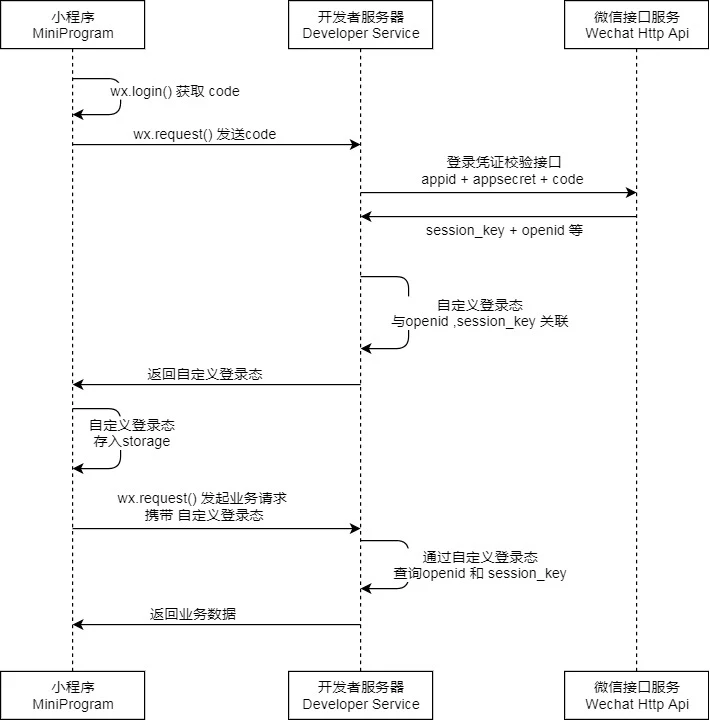
配置文件
需要在配置文件中设置微信小程序的APP ID和secret密钥,用于程序调用微信接口服务时作为参数传递
sky:
  jwt:
    # 设置jwt签名加密时使用的秘钥
    admin-secret-key: itcast
    # 设置jwt过期时间
    admin-ttl: 7200000
    # 设置前端传递过来的令牌名称
    admin-token-name: token
    user-secret-key: itcast
    user-ttl: 7200000
    user-token-name: authentication
  wechat:
    appid: ${sky.wechat.appid}
secret: ${sky.wechat.secret}- 新增了UserController控制器,提供/user/user/login端点处理微信登录
- 实现了基于微信code获取openid并生成JWT令牌的完整流程
@RestController
@RequestMapping("/user/user")
@Api(tags = "C端用户相关接口")
@Slf4j
public class UserController {
    @Autowired
    private UserService userService;
    @Autowired
    private JwtProperties jwtProperties;

    @PostMapping("/login")
    @ApiOperation("微信登录")
    public Result<UserLoginVO> login(@RequestBody UserLoginDTO userLoginDTO) {
        log.info("微信登录:{}", userLoginDTO);
        // 调用service完成微信登录
        User user = userService.wxLogin(userLoginDTO);
        // 为微信用户生成jwt令牌
        Map<String, Object> claims = new HashMap<>();
        claims.put(JwtClaimsConstant.USER_ID, user.getId());
        String token = JwtUtil.createJWT(jwtProperties.getUserSecretKey(), jwtProperties.getUserTtl(), claims);
        UserLoginVO userLoginVO = UserLoginVO.builder()
                .id(user.getId())
                .openid(user.getOpenid())
                .token(token)
                .build();
        return Result.success(userLoginVO);
    }
}- 新增UserService接口及UserServiceImpl实现类
- 实现了微信登录逻辑,包括调用微信接口获取openid、判断新用户并自动注册
@Service
@Slf4j
public class UserServiceImpl implements UserService {

    // 微信登录接口
    public static final String WX_LOGIN_URL = "https://api.weixin.qq.com/sns/jscode2session";
    @Autowired
    private WeChatProperties weChatProperties;
    @Autowired
    private UserMapper userMapper;

    /**
     * 微信登录
     *
     * @param userLoginDTO
     * @return
     */    @Override
    public User wxLogin(UserLoginDTO userLoginDTO) {
        log.info("微信登录,用户数据:{}", userLoginDTO);

        String openid = getOpenid(userLoginDTO.getCode());
        // 判断openid是否为空,如果是,则登录失败,抛出异常
        if (openid == null) {
            throw new LoginFailedException(MessageConstant.LOGIN_FAILED);
        }

        // 判断当前微信用户是否为新用户
        User user = userMapper.getByOpenid(openid);

        // 是新用户,自动完成注册
        if (user == null) {
            user = User.builder()
                    .openid(openid)
                    .createTime(LocalDateTime.now())
                    .build();
            userMapper.insert(user);
        }

        // 返回用户对象
        return user;
    }

    /**
     * 调用微信接口服务,获取当前微信用户的openid
     *     * @param code
     * @return
     */    private String getOpenid(String code) {
        Map<String, String> map = new HashMap<>();
        map.put("appid", weChatProperties.getAppid());
        map.put("secret", weChatProperties.getSecret());
        map.put("js_code", code);
        map.put("grant_type", "authorization_code");
        String json = HttpClientUtil.doGet(WX_LOGIN_URL, map);
        JSONObject jsonObject = JSON.parseObject(json);
        String openid = jsonObject.getString("openid");
        return openid;
    }
}- 新增JwtTokenUserInterceptor用于拦截用户端请求并验证JWT令牌
- 配置了用户端URL模式的拦截规则(
/user/**)
@Component
@Slf4j
public class JwtTokenUserInterceptor implements HandlerInterceptor {

    @Autowired
    private JwtProperties jwtProperties;

    /**
     * 校验jwt
     *     * @param request
     * @param response
     * @param handler
     * @return
     * @throws Exception
     */
    public boolean preHandle(HttpServletRequest request, HttpServletResponse response, Object handler) throws Exception {
        //判断当前拦截到的是Controller的方法还是其他资源
        if (!(handler instanceof HandlerMethod)) {
            //当前拦截到的不是动态方法,直接放行
            return true;
        }

        //1、从请求头中获取令牌
        String token = request.getHeader(jwtProperties.getUserTokenName());

        //2、校验令牌
        try {
            log.info("jwt校验:{}", token);
            Claims claims = JwtUtil.parseJWT(jwtProperties.getUserSecretKey(), token);
            Long userId = Long.valueOf(claims.get(JwtClaimsConstant.USER_ID).toString());
            log.info("当前员工id:", userId);
            // 将员工id保存到当前线程中
            BaseContext.setCurrentId(userId);
            //3、通过,放行
            return true;
        } catch (Exception ex) {
            //4、不通过,响应401状态码
            response.setStatus(401);
            return false;
        }
    }
}- 在WebMvcConfiguration中注册了用户JWT拦截器
- 配置了用户端路径的拦截规则
@Configuration
@Slf4j
public class WebMvcConfiguration extends WebMvcConfigurationSupport {

    @Autowired
    private JwtTokenAdminInterceptor jwtTokenAdminInterceptor;
    @Autowired
    private JwtTokenUserInterceptor jwtTokenUserInterceptor;

    /**
     * 注册自定义拦截器
     *
     * @param registry
     */
    protected void addInterceptors(InterceptorRegistry registry) {
        log.info("开始注册自定义拦截器...");
        registry.addInterceptor(jwtTokenAdminInterceptor)
                .addPathPatterns("/admin/**")
                .excludePathPatterns("/admin/employee/login");
        registry.addInterceptor(jwtTokenUserInterceptor)
                .addPathPatterns("/user/**")
                .excludePathPatterns("/user/user/login")
                .excludePathPatterns("/user/shop/status");
    }
}
导入商品浏览功能代码
- 查询分类:
/user/category/list - 根据分类id查询菜品:
/user/dish/list - 根据分类id查询套餐:
/user/setmeal/list - 根据套餐id查询包含的菜品:
/user/setmeal/dish/{id}